Page 2 - A Closer Look - Hardware and Software

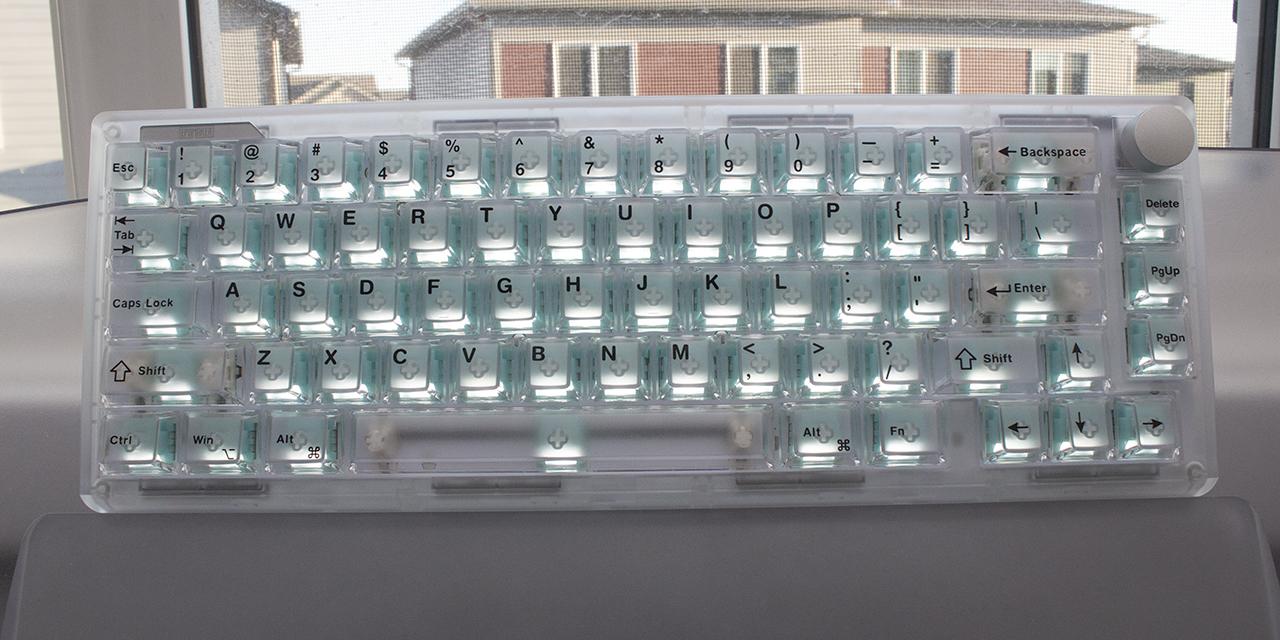
We have seen our share of pink products at APH Networks, especially since it is the Editor-in-Chief's favorite color. As such, when we received the TH65, I almost expected the pink one. This color is displayed in the keycaps, the body, and the tinted volume knob. In the past, I have asked Epomaker to make more colorful keyboards, so I must praise them for making the TH65 so bright and colorful. If you do not like pink, the TH65 is also available in gray-white and black-orange options. The keycaps are not just pink, but they have a translucent ice-like top with a pink interior. This gives it the keycaps a perceived texture or variance that adds to the nuanced design. In its 65% size, this keyboard comes in the same lineup as the TH80 V2 and TH80 V2 Pro, but the form factor and color scheme makes it look very different. The only thing that is consistent among these three models is the volume knob on the top right corner. Otherwise, the Epomaker TH65 is a relatively small option. It has a slim frame that wraps around the keys. On the sides, there is a smooth quadrilateral with a marble-like finish in the middle and translucent rings around the area for RGB LED side lighting. There is one additional area of lighting at the top left corner of the TH65.
In terms of dimensions, the Epomaker TH65 measures 320mm in width, 120mm in depth, and 45mm in height. You can further increase the height by extending the pair of kickstands. The keyboard weighs 826g altogether, which is a bit of heft considering its compact size. In terms of materials, you can see a mostly plastic exterior and keycaps, but a metal volume knob is also present. The overall package is relatively strong. It does torque ever so slightly when you twist the shell. There is also a very little amount of deck flex when pressing a key down in the middle. This is not too surprising, given there is a gasket-mounted polycarbonate plate inside. The front edge of the frame is approximately 18mm tall, which means you can add a palm rest here, but one is not included. The rear edge is 32mm tall.

The Epomaker TH65 is in the standard North American QWERTY ANSI layout, with a total of 66 keys and a volume knob. Keys that are missing include the number pad, function row, and the tilde key next to the number row. The arrow keys have been squashed into the right side with the keys that are normally above the arrow keys reduced into a single column. The bottom row is standard spacing with 1.25U keys on both sides of the space bar. However, Epomaker has also removed the right Ctrl. Otherwise, there are also no indicator lights. Instead, the Caps Lock and the Windows Lock keys are integrated into the backlights, as they glow white when active.

There are secondary functions on the Epomaker TH65, but they are rather far and few. The primary set are all found on the top row of the TH65. Pressing Fn + 1 to '=' will act as F1 to F12. As the tilde and backtick key is missing, you can execute this by pressing Fn + Esc and Fn + Shift + Esc, respectively. Function and Windows key let you lock or unlock this key, which is handy for gaming. When locked, the backlight under the Windows key will glow white. Epomaker also supports Mac functions, and they are placed where you might expect on a Mac keyboard. You can change between operating system key layouts with a switch at the back.

There are some secondary functions for pairing devices over Bluetooth, as Q, W, and E are used for pairing for three different devices. In wireless operation, you can check the battery life by pressing Fn + Enter. Finally, if you make any changes you want to reset, you can hold down Fn + space bar for three seconds, which will revert to factory settings. There are secondary keys for lighting controls, but we will explore these later in the review.

The bottom of the Epomaker TH65 is bare, with only a few things to point out. In the middle, there is a shiny metal plate with information regarding the keyboard. This includes a small description, certifications, the serial number, and a Made in China label. The corners have rubber pads to keep the board in place. There is a pair of two kickstands at the back to provide a total of three different incline angles. The kickstands have rubber pads on them to prevent movement when it is propped up. Under the left kickstand is an insert to keep the USB receiver when it is not in use. At the back of the keyboard, there is a USB Type-C port for connecting the TH65 to your computer with a cable. On one side is a switch to change between Windows and Mac layouts. The other switch has three positions to choose the operation mode of wireless with the dongle, wired, or with Bluetooth.
Inside the Epomaker TH65, there are two 4000mAh batteries for a total of 8000mAh capacity to keep the keyboard going. In our testing, we had solid battery life results. At the time of the review, Epomaker does not provide estimates for battery life. In our testing, I was able to get twenty days of use over wireless with the lights fully on before the TH65 needed to be recharged. To be clear, I was not using it the keyboard 24/7 over the period, but this is still very solid. When it functions over the wireless dongle or wired, the keyboard reports at 1000Hz, but this decreases to 125Hz over Bluetooth. To keep the battery life, the TH65 automatically sleeps when it is not in use. Once you press any key, it automatically wakes back up from sleep.

Over the black XTracGear Carbonic XXL, the Epomaker TH65 stands out in its bright pink color. It is probably the brightest or most vibrant keyboard I have tested in a long time, even with the lights off. The pink really stands out, even beside a blue Epomaker Nex Lite mouse. In terms of layout, most things are where they should be, but I did have to get used to not having a function row immediately accessible or a right Ctrl key. For daily typing, I was satisfied with the TH65. Those who need more keys will likely want to find a keyboard with a larger form factor.
In terms of typing feel, our version of the Epomaker TH65 is very quiet. The Epomaker Crystal Tactile Silent switches offer little audible feedback. These are nonlinear switches, and the tactile bump in the middle is a bit different than what I am used to. You can feel a greater resistance in the at the bump, but it is rather satisfying to press. Bottoming out the switch provides a decent but quiet bonk. It does not feel squishy at the bottom, which makes the whole experience feel solid. Longer keys such as the space bar and Shift keys have a smooth feel with its stabilizers and a deeper sound when pressed. They are still quiet, with no squeaks or rattles heard here. I can understand the appeal of a quiet switch, but I personally enjoy a louder one. Even so, it is a personal preference, so it is worth trying out. The TH65 comes with other switches, including the more audible Creamy Jade switches.

Lighting on the Epomaker TH65 is much more vibrant than other keyboards from Epomaker due to the translucent keycaps, side bars, and small top bar above the Escape and 1 key. The keys are also all front-printed, so the legends are easily visible even in the dark. The only gotcha on the lighting is that the pink keycap adds a pink filter to the rest of the lighting. Altogether, the lights are very pleasing to look at, even if you set it to a single color. The south-facing lights shine out the bottom and around each keycap. There are many backlighting effects with the TH65, and there are many secondary functions to adjust this. When you press Fn followed by an up or down arrow, you will adjust the brightness. Left and right arrows adjust the backlight speed. The '\' key is used for cycling through the effects, while Delete is used to change the colors for the applicable effects. Page Up and Down changes the top left light strip's effect and color, respectively. Similarly, the '.' and '/' key affects the side lights. Finally, you can turn all these illuminated areas off by pressing Fn + Backspace. Alternatively, you can change some of these effects in the software.

The Epomaker TH65's driver is a web utility that is solely accessible over a Chromium-based browser, such as Chrome, Edge, or Opera. Once you go to the website, you can pair the keyboard, and it will automatically recognize it. This works over a wired connection or over the USB dongle. The menu pages are all found on the left side and the breakdown is straightforward. On the left, you can also create savable profiles in a JSON format and load them back later. In this first menu is where you can reassign keys for almost every key on the TH65 other than the volume knob. This includes setting primary and secondary layer functions. The next screen is where you can set the different backlighting, although this does not control the side or top light bar. The Macro Manager is where you can create macros to be assigned on the first page.

Under the Advanced Keys menu, users can set some key settings that we have more often seen on Hall effect switch keyboards. However, none of these require the features of a magnetic switch. This includes SOCD, multi-trigger, toggle switch, and key combination that triggers multiple modifier keys with a single press. Some of these functions may be deemed an unfair advantage in various esports titles, and you may get banned for using these, so do so at your own discretion. The last page called Settings is used to set other application settings like language or for updating the firmware. Overall, the Epomaker web driver works as expected.
Page Index
1. Introduction, Packaging, Specifications
2. A Closer Look - Hardware and Software
3. A Closer Look - Disassembly and Internals
4. Conclusion