Page 2 - A Closer Look - Hardware and Software
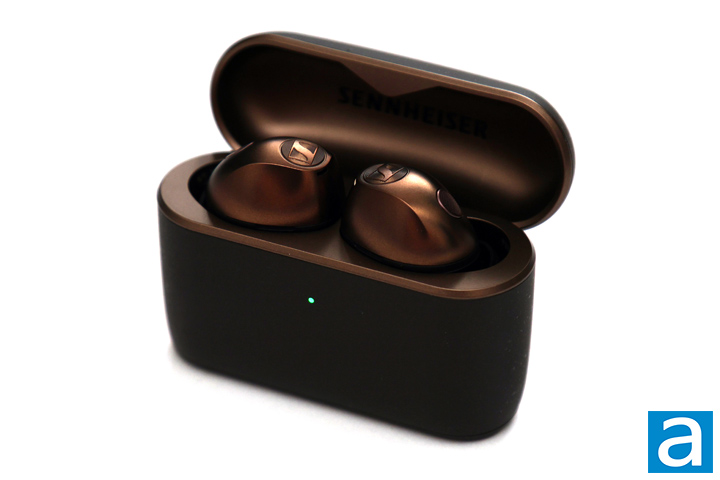
My first impressions of the Sennheiser Momentum True Wireless 5 is one of appreciation to see how much it has matured compared to the first generation one. The original Momentum True Wireless came in a chunky, large carrying case with a fabric cover, but today we have a svelte and sleek rigid plastic shell. It has an eggshell-like texture, with inconsistent speckles around the outside for an easy-to-grip surface. This is also the first time we have a taller and thinner container, as every other Momentum True Wireless model has stuck with the shorter but wider enclosure. The copper finish is very elegant, especially when you look at the inner surface. The Momentum True Wireless 5 comes in other color options, including Cream, Denim, Graphite, and Lavender, but Copper stands out the most. The earbuds are a new shape, with the bean or peanut-like shaped body. There is notable curvature all around the body for a rounded-out shape. The physical size of each side is about 2.5cm in length, 2.0cm in width, and 1.9cm in thickness at their largest dimensions. Each side weighs about 7g, which is noticeable in your ears.
The Sennheiser Momentum True Wireless 5 is controlled through a touch interface that responds to a combination of taps or long presses. The whole body is not touch-sensitive, but only the flatter area outside of your ear is. For default controls, a single tap on the left side will enable transparency mode, while the right will toggle play and pause. Enabling transparency mode will automatically pause the media, but you can change this behavior in the app. A double tap on the left will go to the Previous Track, while the right will go to the Next Track. Tapping and holding will change the volume, with the left to decrease and the right to increase. You can also setup triple tap as an action, but by default the Sennheiser Momentum True Wireless 5 disables it. Overall, I found these touch controls to be easy to use, but it took me time to adjust to the touch areas on the earbuds.
Inside, the Sennheiser Momentum True Wireless 5 connects to your device over Bluetooth 6.0. It supports multiple codecs, including SBC, AAC, aptX, and aptX Adaptive. SBC, or Subband Coding, is the default Bluetooth audio codec with decent audio quality and low processing power requirements. This codec maxes out at 328kbps. AAC, or Advanced Audio Coding, is preferred by Apple's devices and maxes out at 250kbps. Despite having a lower maximum bitrate, AAC is still known to offer better sound quality. Qualcomm's aptX offers up to 352kbps at 44.1kHz sample rate and 384kbps at 48kHz. The aptX Adaptive allows for dynamic bitrates depending on the content and audio quality and scales between 279kbps to 420kbps. Apple devices can only connect with SBC and AAC, while only Android devices with Qualcomm chips inside can take advantage of aptX and its variants.
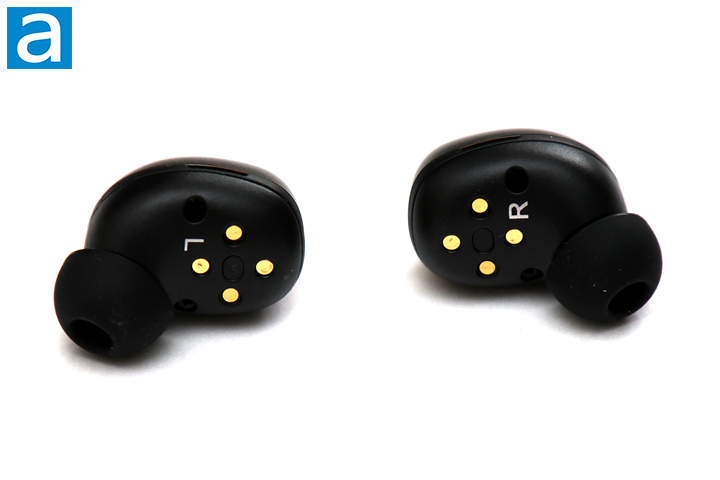
Taking a closer look at each earbud of the Sennheiser Momentum True Wireless, you can see how they deliver audio to your ear. There is an opening that directs sound into your ear canal, while the rest of the body sits in your ear. This in-ear solution ensures audio is directed right into your ear. To create a better seal, there are rubber ear tips surrounding the grille. As mentioned, three other tips are included in varying sizes so that you can find the right size. Swapping out the tips is an effortless process. In addition, you will notice there are two screw holes on each side. Here, you can access the batteries and replace them. You will need to unscrew two on the inner side and partially open the two halves with the included plastic tool. These batteries are proprietary and are currently only available through Sennheiser, but I am still impressed this manufacturer has done this on such a premium product.
Internally, each side has a 7mm True Response dynamic driver, with a speaker frequency range of 5Hz to 21kHz, sensitivity of 107dB, and total harmonic distortion of less than 0.08%. As you already know, the Sennheiser Momentum True Wireless 5 features active noise cancellation, so there are four microphones on each side to help with providing audio feedback and reducing external noises. Otherwise, the earbuds are IP54 rated, which translates to "protection from limited dust ingress and protection from water spray from any direction". These should be safe from sweat, rain, and any dust particulate, but I would not go submerging the Momentum True Wireless 5 earbuds in dirt or water. As well, Sennheiser specifies this rating is only for the earbuds and not the carrying case.
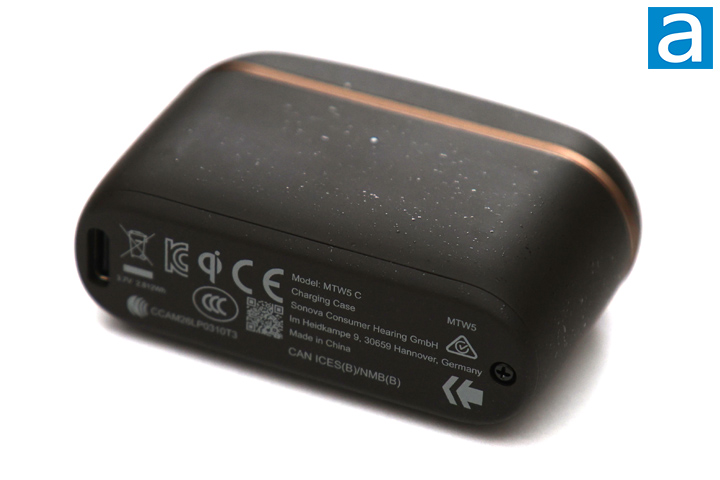
The carrying case of the Sennheiser Momentum True Wireless 5 is also meant to charge the earbuds. This is a flatter and taller unit, measuring 69mm in length, 49mm in width, and 24mm in thickness when closed. This thinner body should fit into most pockets easily. The case alone weighs 55g. The top shell opens by releasing it from integrated magnets. On the front, there is a small multi-color LED to show the battery status. When you open it, it will show the current battery status of the earbuds. When charging, the light will show the charge level with the color and fade in and out until it is fully charged. On the bottom, there is a USB Type-C port for charging, but you can also use a Qi wireless charger. When you first open the Sennheiser Momentum True Wireless 5, the earbuds are automatically in pairing mode. Once connected, they will always try to reconnect to the same device. You can enable dual connection for pairing multiple. If you ever want to pair to a new device, you need to hold both sides of the earbuds for about three seconds to enter pairing mode.
A total of three batteries power the Sennheiser Momentum True Wireless 5. There is a 72mAh one in each of the earbuds and a larger 760mAh battery in the case. According to Sennheiser, we should have a battery life of up to 12 hours per charge with ANC off, 6 hours with ANC on, and a total of 40 hours of listening. We will see how these claims hold up. Modern Android and iOS devices will report the battery life in the operating system, so you can rely on that or the mobile application. A full charge of the earbuds and the charging case will take around 1.5 hours wired, but eight minutes charging will get one hour of usage. Like the earbuds, there is a screw at the bottom of the carrying case so you can access the user-replaceable battery.
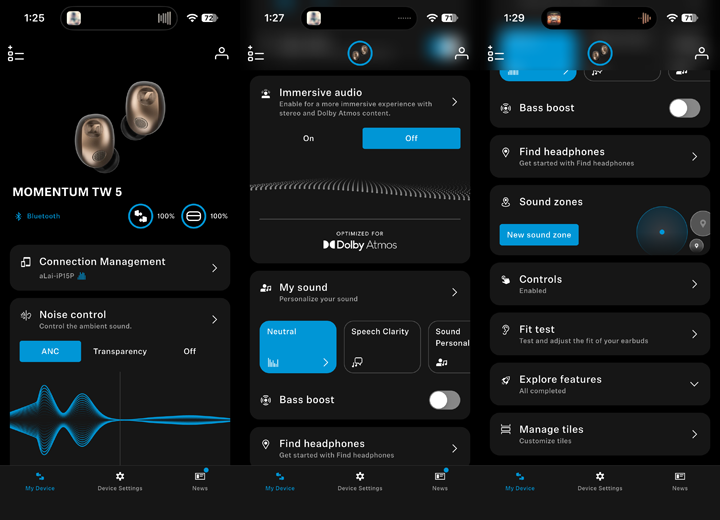
The Momentum True Wireless 5 uses the Sennheiser Smart Control Plus app, which is available on the Google Play Store and Apple App Store. When you first connect, you will see a main page to select your device. Once past this screen, you will see the specific page for the Momentum True Wireless 5. At the top, we have battery life for the earbuds and the carrying case. The first setting is connection management, where you can enable multi-device connection. Next, we have Noise Control, which lets you choose between ANC, Transparency, or Off. Selecting the arrow will let you make modifications such as changing how transparent you want the earbuds to be, if you want to activate it during phone calls, or if you want to auto-pause when enabling transparency. The earbuds will also automatically reduce wind noise, but you can disable this here.
The next setting is Immersive Audio, which lets you enable immersion when used with Dolby Atmos content. Entering this menu lets you also enable head tracking to change the balance based on the physical orientation. Under My Sound, users can change the sound equalizer. Here, you can choose between genre-based presets, one for speech clarity, or a personal sound. If you select a specific profile, you can further customize it with eight dedicated levels to change. There is also a listening test in here to create a personal equalizer setting based on your preferences. Underneath, there is a bass boost toggle to increase the low-end overall. Find headphones is where you can find your earbuds, but it does require location permissions to use the setting.
Under sound zones, you can create and apply settings based on your location, such as at the office or in the gym. This way, the earbuds will be exactly as you expect for certain environments. Controls are where you can set the different actions for each type of action, and this is set individually for each side. Fit test is used to help you ensure you have a good seal with your chosen ear tips. Explore features is a tutorial to help you see all the different settings available, while Manage tiles lets you show or hide the different menus.
Overall, everything in the Smart Control Plus application is both functional and intuitive. It may ask you to register for the app, but if you decline, it will never ask again unless you want to save your user settings to their servers. You also need to enable location permissions for finding headphones, but once again, if you decline, it will never bother you again. This is much better than some other apps we have seen.
Page Index
1. Introduction, Packaging, Specifications
2. A Closer Look - Hardware and Software
3. Subjective Audio Analysis
4. Conclusion