
Page 2 - Physical Look - Outside
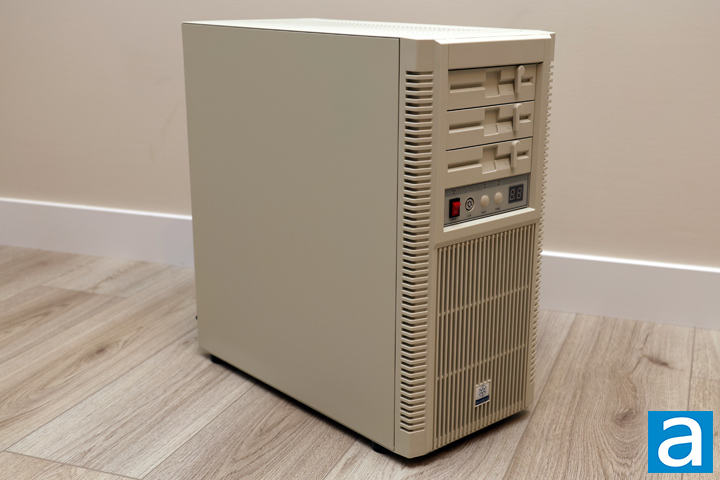
Even after my initial glances, the SilverStone FLP02 amazes me with how well it invokes emotions of nostalgia. We are publishing this review coincidentally with the also retro-inspired Epomaker RT82 wireless mechanical keyboard. For obvious reasons, the appearance leans heavily into the retro vibes. The color is the first aspect, which is perfectly nailed. This looks like any other beige box from the 1980s and 1990s. The second aspect is its front panel. It has a chunky feel with three fake 5.25" floppy disk drives, which are functional covers for 5.25" drives. In the middle is an aged set of convex circular buttons and rectangle LED lights above. Underneath, there are vertical slits for airflow from the front. A large rectangle SilverStone sticker sits in the middle with a slightly bulged finish. The sides are lined with horizontal slices, but they are not porous. The third older-feeling aspect is the side panel, with its solid steel in the same tan color. Rarely do we see modern cases with solid side panels, as they are often see-through or mesh for more airflow. Overall, SilverStone has committed to the bit, and it is magical to see this old style in a contemporary context.
In terms of measurements, the SilverStone FLP02 is a bit more modern in its size. This is no surprise, given our current computers are bigger than the pre-built systems of yore. At 232mm width, 494mm height, and 472mm depth, this 54.09L capacity enclosure is standard for a modern mid-tower ATX chassis. This also weighs 9.79kg, which is light for its size. This is expected for the materials of steel and plastic and the exclusion of any tempered glass.
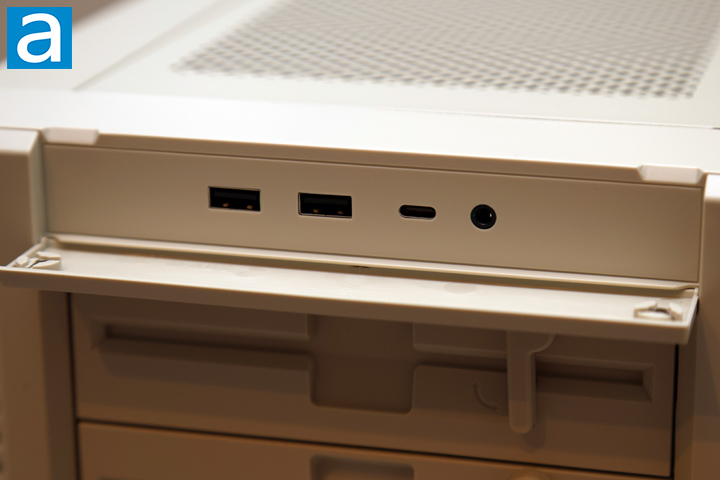
The front panel of the SilverStone FLP02 is divided into two sections, with an attempt to hide the modern looking set of inputs. The front USB and audio jack are hidden under a magnetic flap that opens from the top. When you flip it down, we have a pair of USB 3.1 Type-A ports, USB 3.2 Gen 2 Type-C port, and a single combination audio jack. It might be more aesthetically fitting to have two audio jacks to split headphone output and microphone input, but this is more appropriate for users in 2026.
From this image, you can also get a glimpse of the top panel, which includes a diagonal grid of square holes. Once again, older style cases would have never provided airflow here, especially since all-in-one liquid cooling in the form factor we use today was non-existent back then. Nowadays, top ventilation is common. The whole upper piece can be removed by loosening the thumbscrew at the back and pulling the panel away. This provides users with access to the cooling rails here and easier visibility when building in the FLP02.
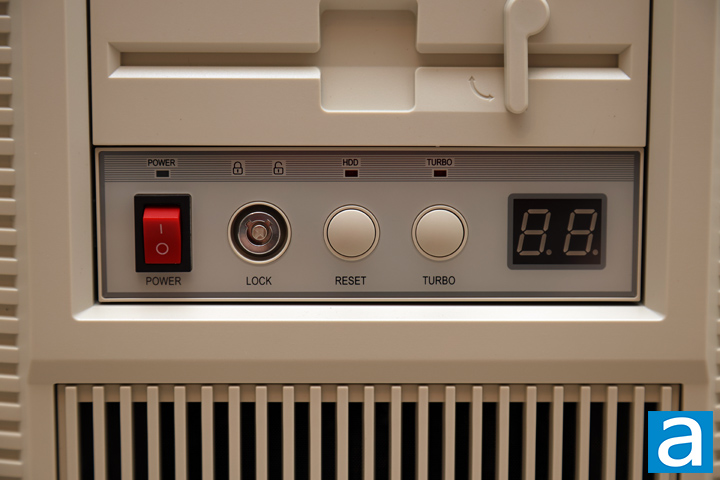
The second part of the front I/O is installed on the bottom 5.25" slot, but you can move it around if you desire. It has another very vintage appearance with a gray background and darker gray lines at the top. Each button and light are clearly labeled. The top row of lights includes a green power LED, red drive activity LED, and an amber turbo LED. The power and turbo lights correspond to the buttons below, and glow when active. The power button is a rocker switch, although it always rests in the off position. This way, users cannot accidentally turn off their machine. Next, there is a barrel key opening to lock and unlock the front I/O. Turning it to locked prevents the power and reset buttons from executing. The reset button acts as you might expect by restarting the system. These two push buttons are extremely satisfying to press with a deep travel and a remarkably familiar feeling.
The Turbo button and the two-digit, seven-segment display are a curious addition. Originally, older software relied on the operating frequency of the Intel 8086 and 8088 processor as its main timing clock. This was important in software like games where the computer would have timed actions. However, when faster CPUs came about, the processor operated at higher frequencies, and their faster clock negatively affected the playability of these games. To resolve this, the Turbo button lets users choose between a standard and a slower, more interoperable mode. For additional clarity, the seven-segment display displayed a series of numbers to indicate a frequency or an operating mode. Nowadays, we do not need this turbo button, as clock timing is determined by alternate methods. For the SilverStone FLP02, the turbo button controls fans via an internal PWM fan hub. When Turbo is selected, the corresponding light turns on and the display shows "HH" to indicate the fans are spinning at full speed. Under normal operation, the light is off, and the display shows the duty cycle of the fans controlled by the motherboard.
The final thing to point out is the false 5.25" drive covers designed to look like floppy drive readers. It may not accent this ancient media anymore, but the lever is still functional to help remove the cover. When you flip the large lever, it retracts a plastic nub, and the slot comes off. This might be seen as overengineered for a simple solution, but once again, SilverStone has gone all in with this vibe and I fully appreciate it.
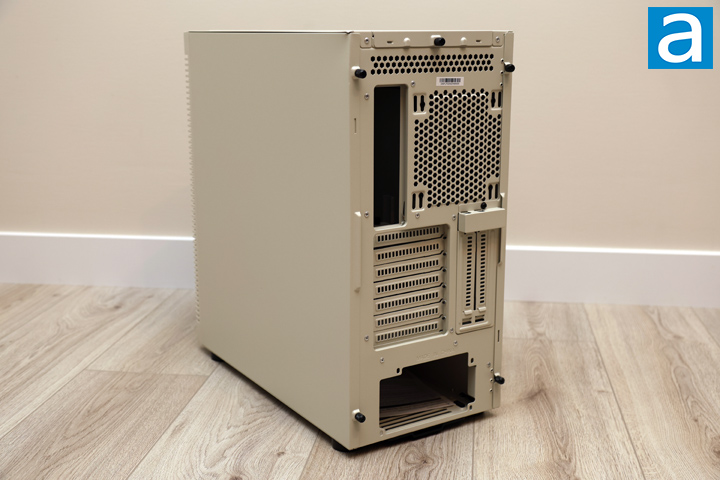
On the other side of the SilverStone FLP02, there is another solid steel panel with no ventilation holes. At the back, there is a large opening at the top for the motherboard I/O. To the right, there are rails with positions to mount a 120mm or 140mm fan. A 120mm fan is already installed behind it. Underneath, there are two sets of expansion slots with perforations. There are seven horizontal slots and two vertical ones. They are all bridgeless with no metal frame between each slot. Finally, at the bottom, there is an opening for an ATX-sized power supply.
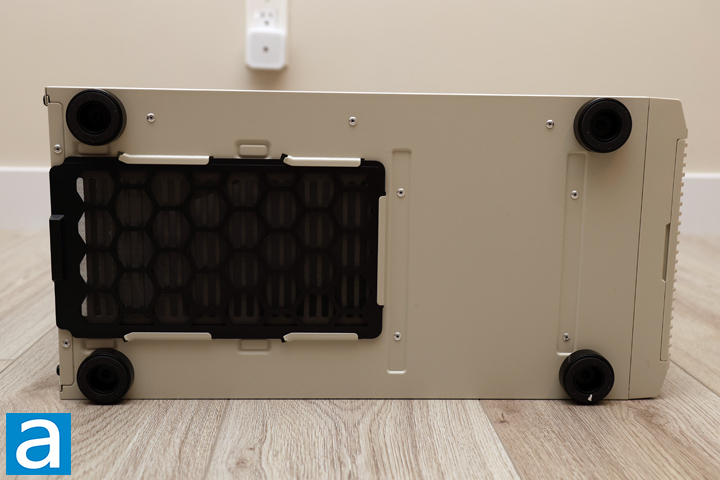
At the bottom, the SilverStone FLP02 has a few other areas to note. In the back middle, there is a removable plastic mesh filter for the intake of the power supply. It sits on metal guides to stay securely in place, and it can be removed from the back. There is a foot in each corner to lift the case up. Each foot is lined with foam to keep the whole box in place and reduce vibrations transmitted between the case and the surface it sits upon. The feet keep the SilverStone FLP02 off the surface by around 12mm, which is a bit limited for air intake. Even if this throwback design would not normally have an opening underneath, I wish SilverStone raised the FLP02 up a bit more.
Page Index
1. Introduction, Packaging, Specifications
2. Physical Look - Outside
3. Physical Look - Inside
4. Installation and Conclusion





