
Page 2 - A Closer Look - Hardware and Software
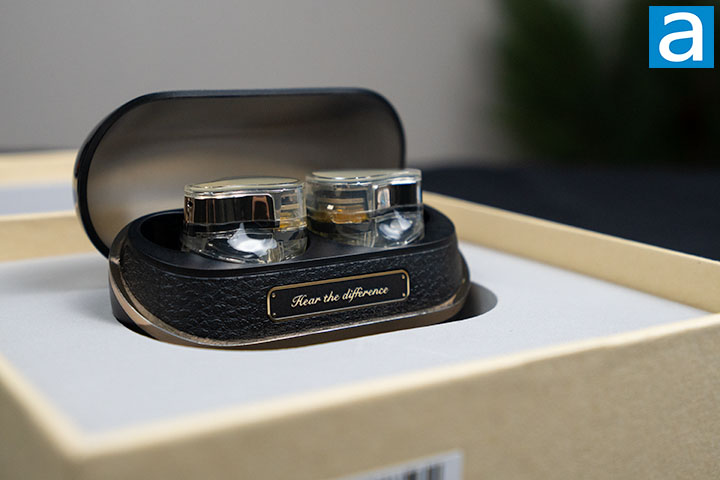
The SOUNDPEATS H3 is only available in the color scheme of lemon yellow, with transparent plastic enclosing the earbuds. The backplates of the earbuds have a smooth, glossy pattern printed on top of a textured, glossy background. The shape of the backplate is like a teardrop, which is also the same shape as the transparent plastic it is sitting under. The earbuds have a techie feel to them due to the translucent casing revealing all the internal components. My first impression of the SOUNDPEATS H3 when I held them in my hands was they seemed rather big. They measure to be about 2.4cm in length, 1.9cm in width, and 2.5cm in height, with a weight of 6g for each earbud.
For touch commands, the SOUNDPEATS H3 detects them by tapping the back of the earbuds. By default, one tap on the left earbud turns the volume down, while the right earbud turns the volume up. Double-tapping either the left or right plays or pauses the audio. Triple-tapping the left enters game mode, while the right will activate the phone's voice assistant. Pressing the left earbud for 1.5s will swap between noise cancelling, normal, and transparent mode. Doing the same to the right side will jump to the next track. For the earbuds to register the commands, it takes a very light touch and about half a second before execution. Whenever the modes are changed, a voice will play to confirm the command has been registered. The earbuds were able to detect my tap commands quite well as long as I made sure to tap near the center of the back.
The SOUNDPEATS H3 utilizes Bluetooth 5.4 and supports AAC, SBC, LDAC, aptX, aptX Adaptive, and aptX Lossless audio codecs. By default, Bluetooth uses Subband Coding, or SBC, to encode audio. Its relative simplicity reduces the processing power required. The bit rate for SBC can go up to 328kbps and supports 16-bit 48kHz audio. AAC, or Advanced Audio Codec, is a more complex algorithm that encodes audio with better quality at 24-bit 44.1kHz despite having at a lower maximum bit rate of 250kbps. It is the preferred codec for Apple devices. LDAC is made by Sony, which has bit rates of up to 990kbps and supports 24-bit 96kHz audio. Qualcomm's aptX codec has multiple versions, which are aptX, aptX lossless, aptX adaptive, aptX low latency, and aptX HD. Standard aptX has a bit rate of 352kbps and supports 16-bit 44.1kHz audio. aptX lossless aims to deliver perfect CD quality with bit rates of about 1000kbps for 16-bit 44.1kHz audio. aptX adaptive, on the other hand, aims to adapt the Bluetooth parameters to the content being played and the surrounding radio frequency environment. Its bit rate ranges from 276kbps to 420kbps and supports 24-bit 48kHz audio. The SOUNDPEATS H3 does not list aptX low latency and aptX HD as supported codecs.

Taking a closer look at the SOUNDPEATS H3 earbuds, it is possible to see the transducers inside due to the transparent casing. The most obvious one is the 12mm dynamic driver located right under the label that shows which eabud is left or right. The material used for the diagram is not specified. The two balanced armature drivers are a bit harder to spot. They are located right at the tip of where the earbuds enter the ear canal. Above the dynamic driver, there are two exposed metallic plates that make contact with the pogo pins on the case for charging purposes. I was unable to identify where the mics are, but there are three on each earbud. SOUNDPEATS says "two external mics use beamforming technology to isolate your voice from environmental sounds, while an internal mic captures pure in-ear vibrations". The earbuds also incorporate the Qualcomm cVc 8.0 algorithm, which is a software for cancelling background noise to improve voice clarity during phone calls.
Considering the size of the SOUNDPEATS H3, I expected them to easily fall out during use. However, when I attempted to violently shake my head around or jump up and down, I was surprised by how well they stayed in my ear. Although they look big in my ears, I do not find them to be heavy at all. The earbuds are also safe to use when walking in the rain, as they are rated to be IPX5, which means they are protected against low-pressure water jets from any angle.
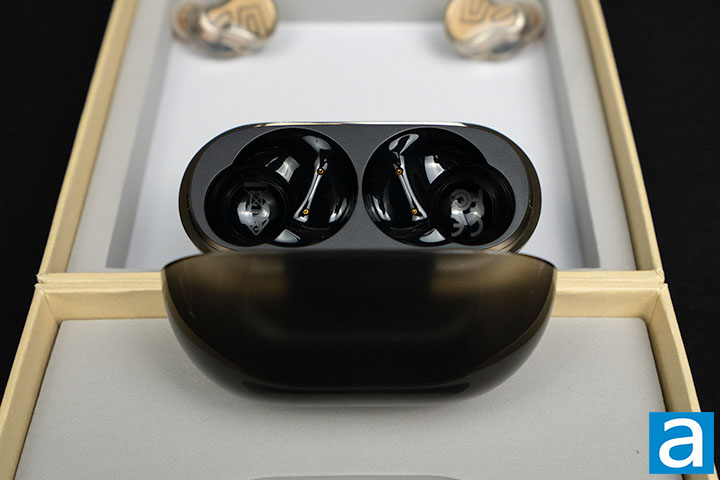
The case weighs 41g alone and 53g with the earbuds inside. I measured the size to be about 7cm in length, 3cm in width, and 5cm in height. Although the case fits in my pockets without any problems, it is big enough to be easily noticeable. I find the visual design of the case to be quite elegant. The lid is made with translucent black plastic. The bottom part is made with solid black plastic and is separated from the lid by a glossy lime yellow stripe. This glossy stripe adds a pleasing, eye-catching contrast to the rest of the case. On the backside, there is the SOUNDPEATS logo sitting in the center of a rectangle with the same glossy lime yellow color as the stripe. The mechanism for opening the lid is very smooth and snaps into place for both the open and closed positions. The lid was also able to remain closed even when I attempted to violently shake it open. Opening the lid reveals an elegant panel that says "hear the difference". The surrounding plastic has a bumpy texture similar to the texture found on leather. Inside where the earbuds would sit, the plastic has a glossy finish and contains the pogo pins for charging.
At the bottom center of the case, there is an LED light to indicate battery status. When the lid is opened or closed, it will shine green between 50% and 100%, yellow between 10% and 49%, and red below 10% battery. During charging, the LED will shine solid green at 100%, blink green between 70% and 99%, blink yellow between 20% and 69%, and blink red below 20%. The earbuds are charged through the case, while the case is charged through a USB Type-C port on the bottom.
When the lid of the case is opened, the earbuds will automatically connect to the previously connected device. The SOUNDPEATS H3 also supports dual device connection when LDAC is turned off, but the connection process is not very intuitive. After connecting the first device, you have to turn off Bluetooth on the first and then connect the second device. Once connected, it works quite well. The earbuds will automatically switch depending on which one is playing audio. During my testing, the earbuds prioritized my PC over the phone for audio playback. If I first play audio on my phone then my PC, the earbuds will switch to the PC audio, but not the other way around. To reset the earbuds to factory settings, there is a button on the back of the case that can be held for 10s until the LED flashes white and red twice.
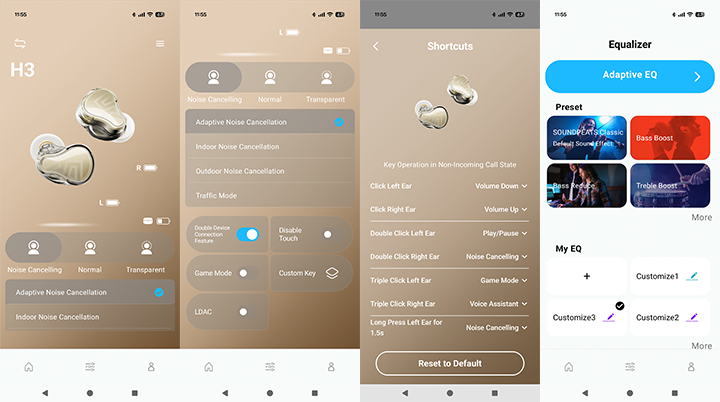
The PeatsAudio app is available on Android and iOS in their respective app stores. On the main page, the app displays the earbuds and case battery levels. Scrolling down, there are buttons to toggle earbud transparency modes, touch command, game mode, and LDAC. There is also a button labeled "Custom Key" to enter the menu for customizing touch commands. Game mode reduces latency. In transparent mode, there is the option for standard transparency or voice enhancement. Noise cancelling has even more modes, with adaptive noise cancellation, indoor noise cancellation, outdoor noise cancellation, and traffic mode. On the equalizer page, there are options to choose a preset or create a custom one. There is also the Adaptive EQ option, which will play a range of frequencies and ask you to click a button when you hear or do not hear the sound anymore. Then it will take the data and generate an EQ at the end. Going back to the main page, there is a hamburger button at the top right. Clicking it will bring you to the more functions screen, where you can check device information, upgrade firmware, reset the earbuds, fit test, find the earbuds, switch prompt language, and adjust prompt volume.
The app is adequate and works for its intended purpose, but there are some bugs. When I open the EQ page, it sometimes disconnects the earbuds. When editing the touch commands, sometimes the changes are applied without visually updating the display. After closing the page and reopening it, the change would be displayed. These cause some inconveniences, but there are no major bugs that affect functionality.
Page Index
1. Introduction, Packaging, Specifications
2. Physical Look - Hardware and Software
3. Subjective Audio Analysis
4. Conclusion





