By: Alford Xue (Guest Editor)
December 19, 2025
For most of my childhood, the computers I grew up with were already considered outdated by the time they made their way into our home. My dad worked as a lab technician at a university, which meant surplus or retired desktop systems often found a second life on our desks. Our home setups often consisted of keyboards you would typically find in old offices or labs. Thick plastic chassis, yellowed keycaps, stiff rubber domes, and long, coiled cables were simply the norm. At the time, I did not question any of it. I stuck with similar wired keyboards for years after, never giving much thought to typing feel or acoustics. That all changed when I opened up the be quiet! Dark Mount Silent Tactile. This was my first hands-on experience with a premium tactile mechanical keyboard, and it immediately reframed my expectations. The combination of the quiet switches, media dock, programmable ARGB LED lighting, and customizable buttons made typing genuinely enjoyable. Compared to the clacky keyboards I was used to, the Dark Mount is significantly quieter without sacrificing the satisfying tactile feedback. be quiet! claims it delivers a refined and quiet typing experience, but does it actually live up to that promise? Read on to find out.

The be quiet! Light Mount Silent Tactile traveled all the way from Ontario, California, United States, to our location in Calgary, Alberta, Canada, through UPS Standard shipping. This product was also shipped alongside the be quiet! Light Mount Silent Linear. The contents of the box were in excellent condition despite having a few dents and cracks.
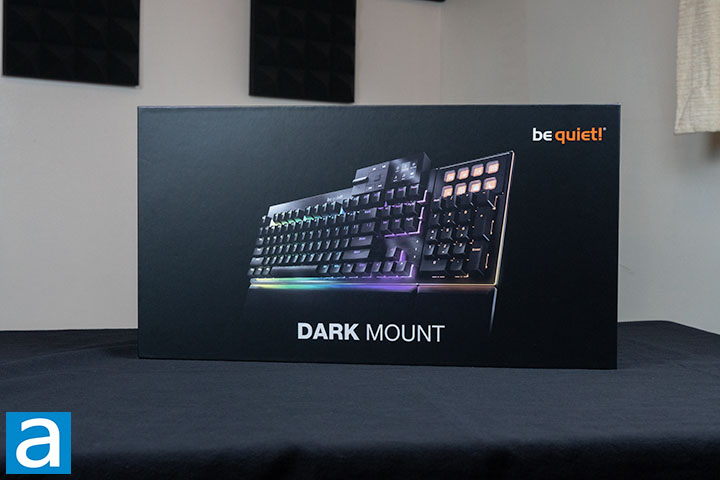
The packaging for the Dark Mount is minimalistic and straightforward, giving it a sleek, clean appearance. The top of the retail box displays an image of the product with its ARGB LED lighting on full display, accompanied by the product name and manufacturer’s logo set against a solid black background. The sides continue this simple design, while the back provides more details, including technical data, key specifications, hardware and software details, and the box’s contents. The back of the retail box also provides QR codes that lead to the manufacturer’s website and the download site for the accompanying software.
Here are the specifications for the Dark Mount that can be found on the manufacturer's website:
Model: Dark Mount Silent Tactile US ANSI
Dimensions (L x W x H), (mm) : 256 x 456 x 52
Dimensions without palm rest (L x W x H), (mm): 174 x 456 x 52
Color option: Black
Total weight (kg): 1.59
Weight without palm rest (kg): 1.38
Switch type: be quiet! Silent Tactile mechanical switches
Switch socket: 5-pin, Cherry MX form factor
Backlight: RGB
Layout: US layout, ANSI
Materials: Aluminum top-plate, ABS bottom, PBT keycaps
Warranty: 2 Years
MCU: Cortex M0
Software support: be quiet! IO Center & IO Center Web
Key rollover: Full NKRO via USB
Keycaps: be quiet! PBT double-shot
Stabilizer: Genuine Cherry, screwed-in & lubed
On-the-fly system: ✓, via FN-key
Polling rate (Hz): 1000
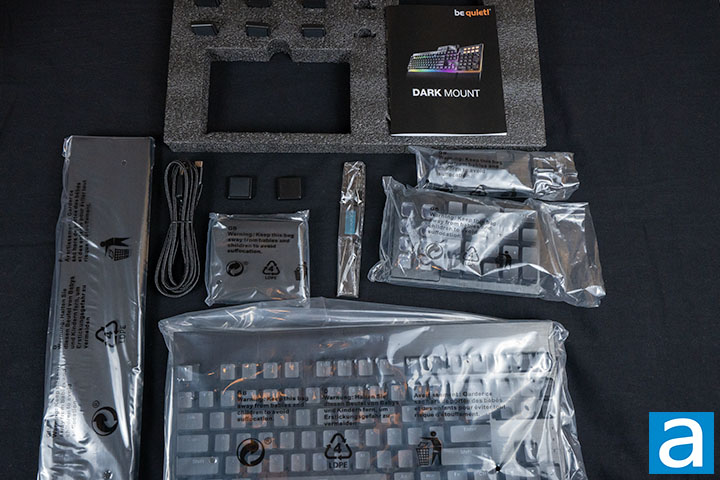
The Dark Mount Silent Tactile comes packaged in a three-layer setup, with all contents snugly secured in foam and plastic to protect them from impact. The first layer contains the keyboard itself, with the user manual tucked underneath. The second layer holds the keyboard’s palm rest, USB Type-C 3.2 cable, and both the number pad and multimedia dock accessories. The final bottom layer includes the keycap puller, two sets of magnetic tilt pads, and the dedicated palm rest for the number pad.
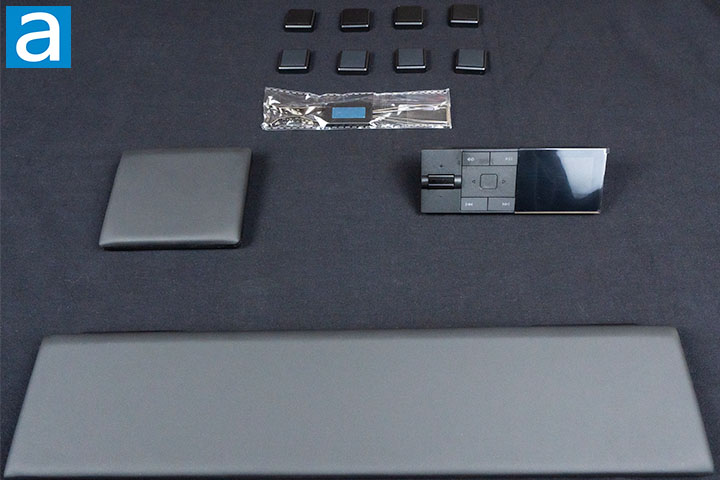
The photo above displays some of the accessories without their protective packaging. On the left and bottom side of the top photo sits the keyboard’s palm rest. Also shown above are two types of magnetic tilt pads. The first tilt pad has rubber padding and is designed to be contacting with the desk, while the second is metal. Finally, on the right is the multimedia dock.
Page Index
1. Introduction, Packaging, Specifications
2. A Closer Look - Hardware and Software
3. A Closer Look - Disassembly and Internals
4. Conclusion