Page 2 - A Closer Look - Hardware

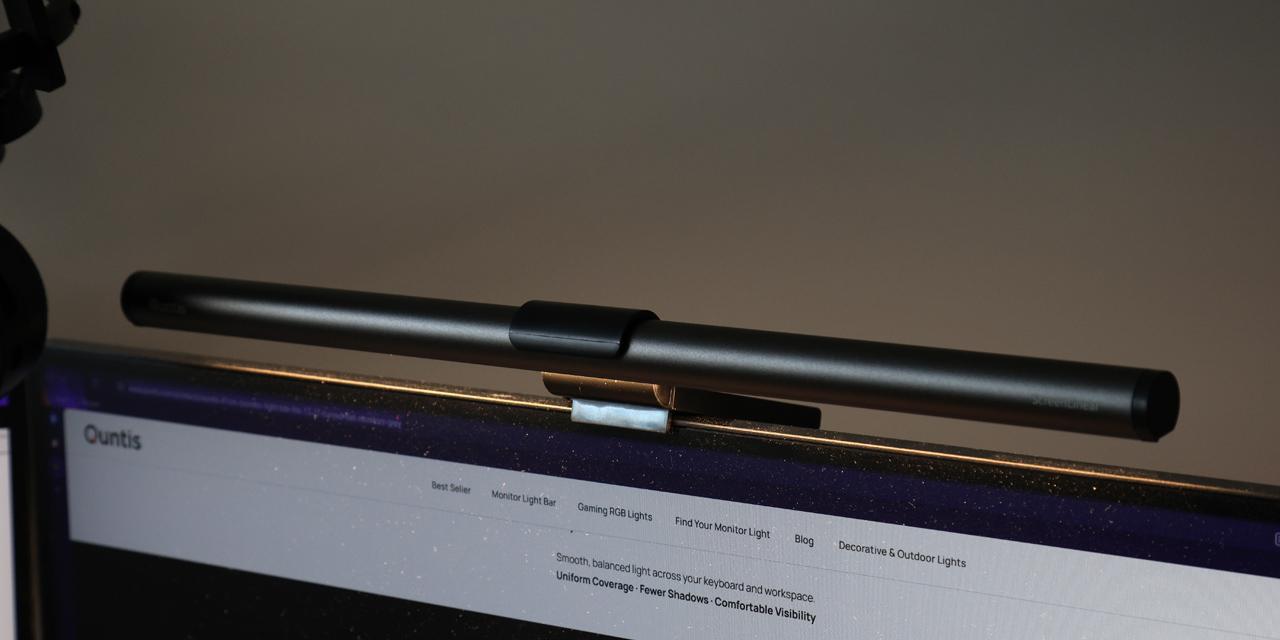
The Quntis Monitor Light Bar Focus 41cm Grey is not a complicated product, as it is a lamp for your screen. However, there are a few physical aspects that make it more than just another light source. The unit is made up of two primary parts. The first is the cylindrical aluminum lighting bar. This slim structure measures 410mm in length and approximately 20mm in diameter. It is not a pure cylinder, as the clear area where the LEDs sit is flat. The whole bar has a gray aluminum shell with ABS plastic on the ends. The Quntis logo can be found on one end, with a "ScreenLinear" marking on the other end. The bar does not feel flimsy in any manner, and it has a 116g weight.

The second part of the Quntis Monitor Light Bar Focus 41cm Grey is the monitor stand. This product sits above your monitor, so the stand rests on the frame. There is a black clip that attaches to the center of the aluminum light bar and allows for 45-degrees of swiveling motion. In addition to this movement, the clip can extend out of the stand for an additional 2.5cm to sit further in front of the screen. Behind the clip is a large flat portion. Due to its placement, the Quntis Monitor Light Bar Focus 41cm Grey sits where someone may already have a webcam. As such, Quntis has designed a large flat area behind the clamp so users can rest the webcam here and ensure both peripherals are in their optimal positions. Otherwise, the back of the stand has a large counterweight to ensure the Quntis Monitor Light Bar Focus 41cm Grey stays in place. The stand separately weighs 230g, with majority of the mass found in the large circular weight. This sits on a hinge so users can install this on screens of varying thickness or curvature of 1000R. The counterweight portion has a sticky side to grip to the back of your monitor if you need it.
The third part of the Quntis Monitor Light Bar Focus 41cm Grey is a separate black puck. This is a remote control with touch controls on the top. In the middle, there is a power button. At the bottom, there are two different adjustments to toggle between. The left button is to change the brightness, while the right button is to change the color temperature. There are small pinhole lights above both buttons to indicate the current adjustment mode. In either mode, use the '-' and '+' buttons to decrease and increase the level, respectively. In brightness mode, you can step between 25%, 50%, 75%, and 100% of brightness. When changing color temperature, this changes between four levels of 3000K, 4000K, 5000K, and 6500K. However, when you tap and hold the buttons when in either mode, this will gradually change the level rather than stepping between these preset levels. Underneath the control, there is a cover for the two AAA batteries to power the unit. It also should be noted since there are no controls on the Monitor Light Bar Focus 41cm Grey, you always need this remote control. However, it can be paired with multiple light bars at once. Unfortunately, this monitor light does not have any automatic adjustments for brightness or color temperature. I think it would have been beneficial to see controls on the light bar itself.

At the back, you will see a single USB Type-C port to power the monitor. This light expects 1.5A of current to power the unit, which means most standard USB ports will not be capable of providing enough power, and you should get your own USB AC adapter. Inside the light bar, there is a total of 72 LEDs spread across. This provides a center illuminance of 900 lux. This quantitative measurement determines how much visible light falls onto a given surface area. The unit of lux equates to a lumen of light over one square meter. The Quntis Monitor Light Bar Focus 41cm Grey also has a color rendering index, or CRI, of 95. This unit indicates how accurately an artificial light source can reveal the true colors of objects compared to natural lighting or incandescent lighting. This is a scale from 0 to 100, so a score of 95 is quite good. Quntis also notes the lighting is flicker-free.
Page Index
1. Introduction, Packaging, Specifications
2. A Closer Look - Hardware
3. Installation and Usage
4. Conclusion