Page 3 - Installation and Test Results
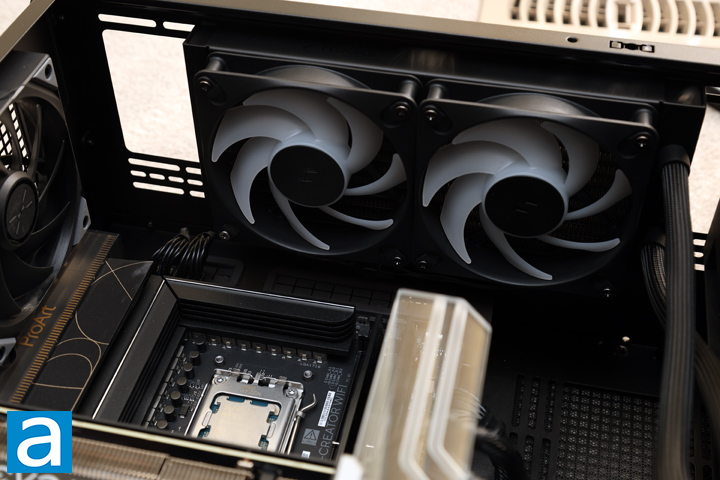
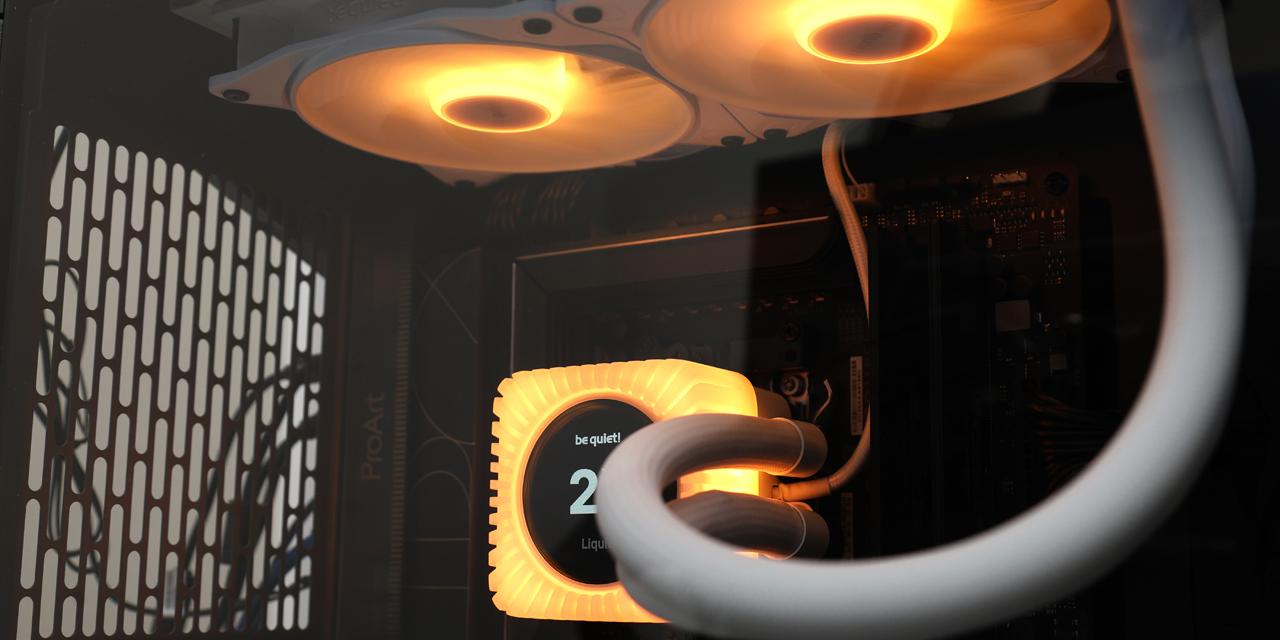
To start, you can either mount the water pump and block first or install the fan and radiator. I am not entirely sure which I prefer, but I often install the pump first. In this case, I did the reverse and mounted the radiator and fans to the top of the case. Due to the tube material and length, I was able to make the tubes start kinking at certain points, so I had to be careful in navigating the tubes to avoid this situation. While a flexible tube is helpful for maneuvering, it should still hold under its own structure, which is a bit unfortunate here. With the pivoting connection point on the block, it was easy to reposition the pipes as needed, and there was no extreme bending when I finished.
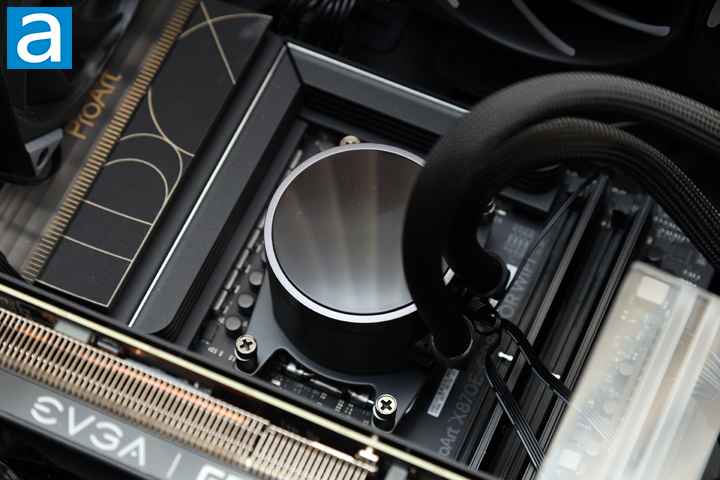
Installation of the water block is simple, regardless of whether you have an AMD or Intel system. For Intel, the primary difference is using the included backplate and swapping the mounting arms. For installation with an AMD CPU, you can use your backplate provided by your motherboard. With the thermal paste already applied, all you have to do is screw the four protruding screws. Fractal Design recommends mounting in a cross pattern by going from one corner to the diagonally opposite one. I would also recommend slowly installing it stepwise and working your way with the cross pattern instead of screwing one corner down fully before moving to the next.
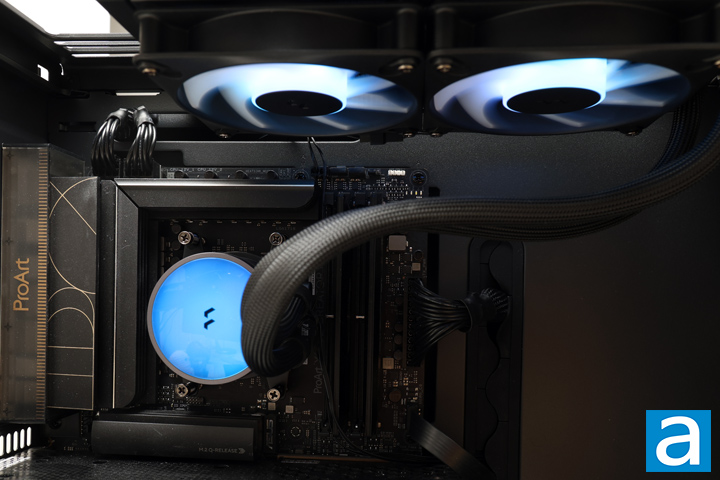
Our test configuration is as follows:
CPU: AMD Ryzen 7 9700X
Motherboard: ASUS ProArt X870E-Creator WiFi
RAM: Crucial Pro Overclocking DDR5-6400 2x16GB
Graphics: EVGA GeForce RTX 3070 Ti XC3 ULTRA GAMING
Chassis: TRYX FLOVA F50
Storage: Lexar Professional NM800 PRO 2TB, Kingston NV3 2TB
Power: be quiet! Straight Power 12 1200W
Operating System: Microsoft Windows 11 Pro (25H2)
Compared hardware:
- Fractal Design Radius 240 RGB Black
- be quiet! Dark Rock 6
- be quiet! Dark Rock Elite
- be quiet! Dark Rock Pro 6
- FSP MP7 Black
All tests were run on our custom-built computer to best reflect real life performance. The computer remained in the same location in the same room throughout all tests. The room temperature in our testing lab was around 23c. Each cooler was used with its stock thermal paste to rate its performance. All thermal pastes were given a proper amount of time for them to fully settle. The fans on all heatsinks were connected to the motherboard's CPU 4-pin fan header. The test computer was turned on and left idling for at least one hour for the idling tests. High CPU load results were obtained using Prime95 Small FFT tests for a minimum of 10 minutes or until the temperature was deemed stable. Temperature results were measured with HWiNFO, which reports the CPU's integrated digital thermal sensor for maximum accuracy. Each temperature result was calculated by taking the maximum value of the cores inside the CPU.
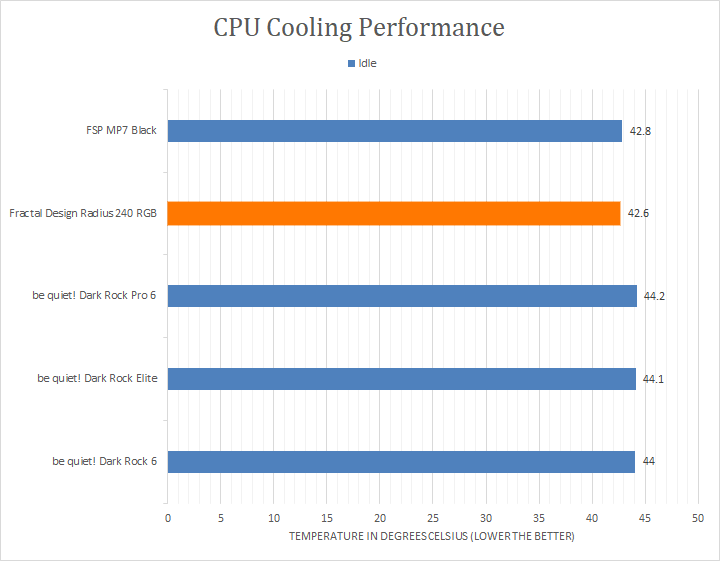
After letting my computer idle for a while, I checked the temperature of the processor. From the first graph, you can see the Fractal Design Radius 240 RGB Black idled at a temperature of 42.6c. This was the lowest among the coolers, including some of the larger air coolers. This gives a promising idea of the capabilities, but it is not a full presentation of the capabilities. As such, I started up the Prime95 tests to reveal the Radius 240 RGB Black's abilities.
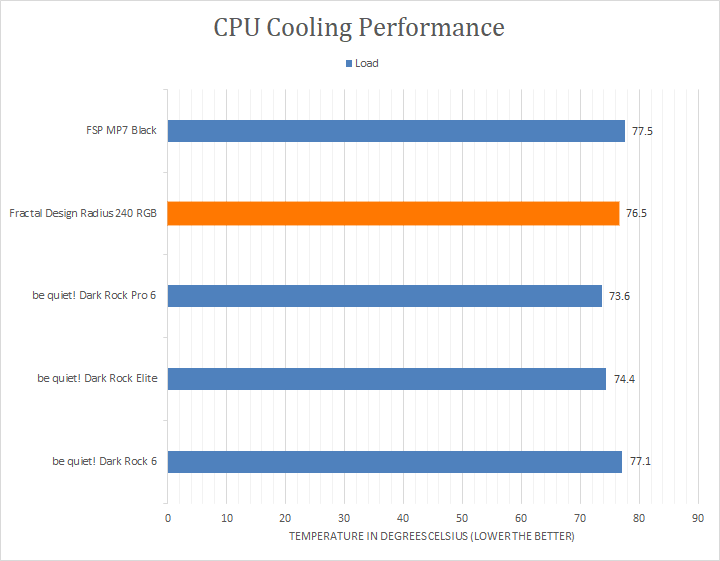
With sufficient time to load the processor, you can see how this AIO cooler performed with the peak sustained temperature recorded. The Fractal Design Radius 240 RGB Black stabilized at 76.5c. This is not necessarily the best nor worst performer, as it was smack in the middle. It was also almost three degrees warmer than the be quiet! Dark Rock Pro 6. This is still good given the 240mm size of the radiator. There was no thermal throttling during our testing, and all cores were able to reach and sustain their boost frequencies.
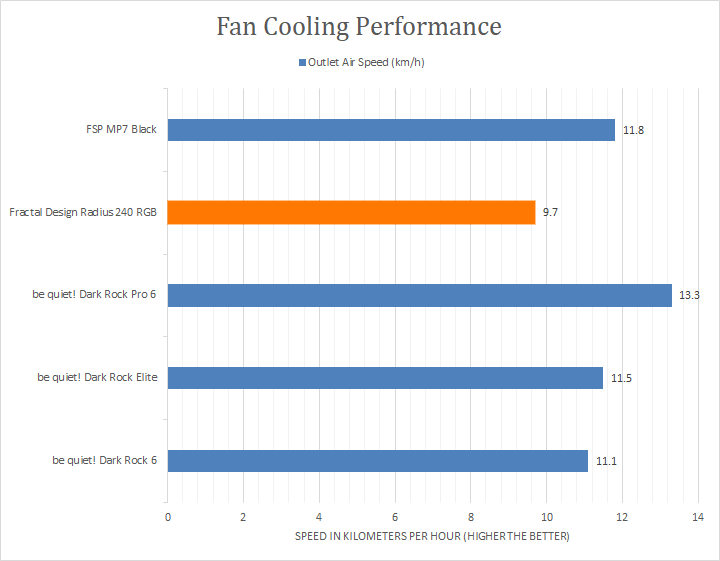
In addition to the cooling performance tests, we also quantitatively measured the performance of the cooler by measuring the air speed at the outlet. The purpose of these tests is to see the airflow and static pressure of the complete cooling solution. Higher airflow is better, as it indicates the cooler's capability in transferring heat from the metal radiator to the air.
At the output of the Fractal Design Radius 240 RGB Black, located by the two fans, we measured an airspeed of 9.7km/h or 6.0mph. Interestingly, this is the lowest recorded speed of the bunch, although it is understandable given the other coolers use two fans with one stacked in front of the other. Also, it is our only radiator on the list, which is denser than any of our heatsinks. Even so, the two Dynamic 3 - 12 RGB fans, at their maximum 2200RPM each, were capable in moving air and providing cooling in the loop.
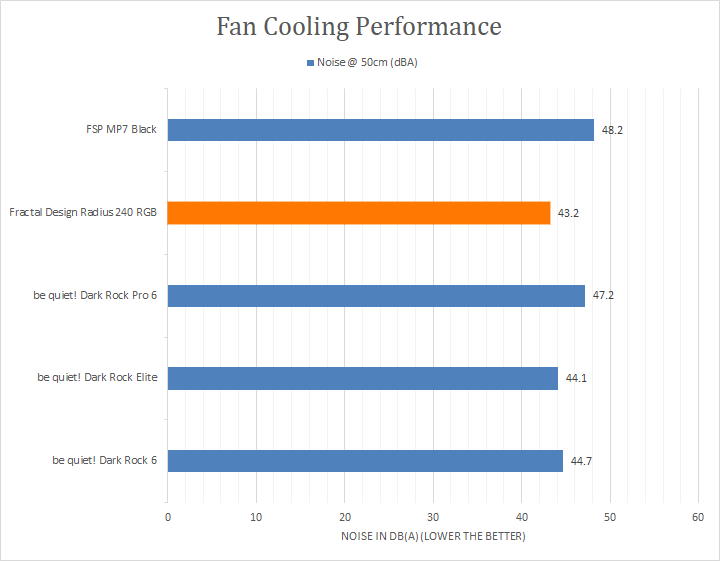
The noise produced by the Fractal Design Radius 240 RGB Black is one of the quieter ones, even at maximum speeds. Measuring from 50cm away, the cooler produced a maximum 43.2dBA of noise, ranking the lowest even compared to a single fan be quiet! Dark Rock 6.
From a subjective standpoint, on a scale of 0 to 10, where 0 is silent and 10 is loud, I would rate the Fractal Design Radius 240 RGB Black at 4.5/10 on full load. While the measured noise value may not jump off the page, you can hear the combination of the fans and the water pump when it is pressed to the maximum. The higher frequency of the pump is noticeable at full blast, which makes it feel more annoying, even if it is not necessarily a measurably louder sound. In everyday circumstances, the Fractal Design Radius 240 RGB Black is quieter with the reduced pump and fan speeds, and there are no other noises that are noticeable other than the fans themselves. In fact, I would call the cooler equivalent to a standard two 120mm fan air cooler in terms of noise.
Page Index
1. Introduction, Packaging, Specifications
2. A Closer Look - Hardware and Software
3. Installation and Test Results
4. Conclusion