Page 3 - Installation and Test Results
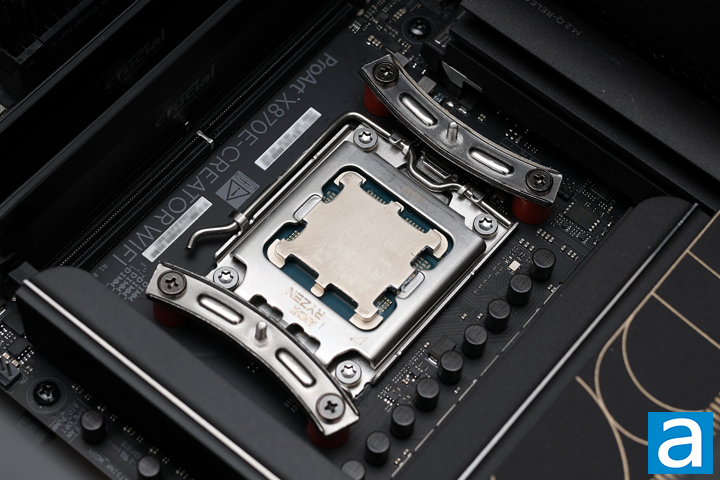
Installation of the FSP MP7 Black is a straightforward process and is like the mounting process from other manufacturers. With Intel systems, you can use the included backplate and spacers to mount a square ring on the motherboard side. Afterwards, you can secure the heatsink to the ring. For AMD systems, you can use the backplate included with your motherboard. This starts by removing the plastic hooks that are installed by default, and instead screwing the two mounting bars with spacers on the CPU side.
The separate bars are only used for AMD motherboards, and it has a screw standoff to attach the MP7 Black to. Be sure to orient the bars so that they curve inward and towards the processor. From here, you can squeeze out some thermal paste on the integrated heatspreader of your CPU. FSP has provided a purple tube of grease for multiple installations. However, I found the paste to be quite difficult to use and did not stay. I was able to apply enough for testing purposes, but I found this grease to be more solid than liquid, which meant it often stuck to the applicator instead of the processor. FSP should improve their thermal grease to make it easier to apply.
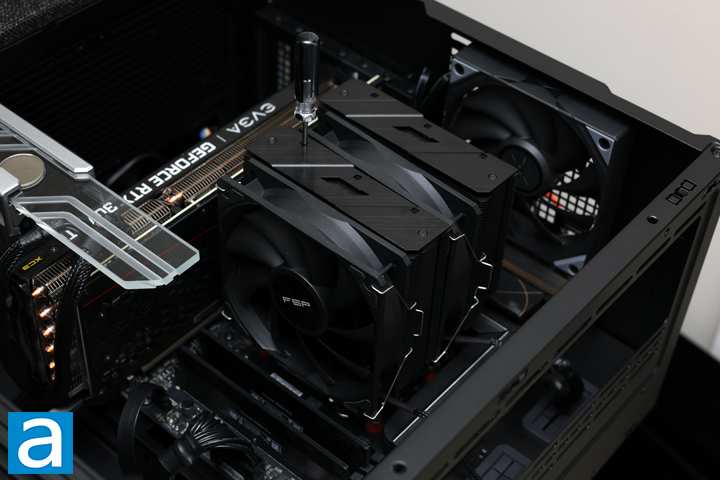
Afterwards, you can place the FSP MP7 Black over the mounting hardware and secure it to the two protruding screws. You do not need to remove the fans, as the screws are right under the front stack of fins. Instead, you need to use the included screwdriver and insert it into the square holes at the top of the fins to reach the screws underneath. Be sure to tighten these screws in an alternating fashion to evenly attach the heatsink to the metal attachments underneath. While I appreciate the included screwdriver, you are limited to this one, as it is unlikely any other screwdriver can fit in the square holes. It also is a bit tricky to see if the whole unit aligns properly, so you should work slowly and carefully. As I have pointed out previously, the MP7 with its front fan in default position hovers over the closest memory slot.

Our test configuration is as follows:
CPU: AMD Ryzen 7 9700X
Motherboard: ASUS ProArt X870E-Creator WiFi
RAM: Crucial Pro Overclocking DDR5-6400 2x16GB
Graphics: EVGA GeForce RTX 3070 Ti XC3 ULTRA GAMING
Chassis: TRYX FLOVA F50
Storage: Lexar Professional NM800 PRO 2TB, Kingston NV3 2TB
Power: be quiet! Straight Power 12 1200W
Operating System: Microsoft Windows 11 Pro (25H2)
Compared hardware:
- FSP MP7 Black
- be quiet! Dark Rock Elite
All tests were run on our custom-built computer to best reflect real life performance. The computer remained in the same location in the same room throughout all tests. The room temperature in our testing lab was around 23c. Each cooler was used with its stock thermal paste to rate its performance. All thermal pastes were given a proper amount of time for them to fully settle. The fans on all heatsinks were connected to the motherboard's CPU 4-pin fan header. The test computer was turned on and left idling for at least one hour for the idling tests. High CPU load results were obtained using the Prime95 built-in benchmarks with the tested CPU for a minimum of 10 minutes or until the temperature was deemed stable. Temperature results were measured with HWiNFO, which reports the CPU's integrated digital thermal sensor for maximum accuracy. Each temperature result was calculated by taking the maximum value of the cores inside the CPU.
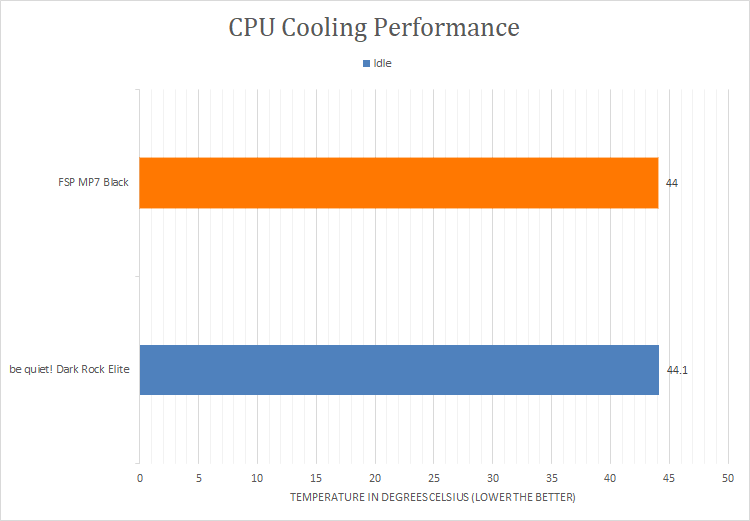
After letting my computer sit idle for a while, I checked the temperature of the processor. From the first graph, you can see the FSP MP7 Black idled at a temperature of 44c. This was ever so slightly better than the other cooler, the be quiet! Dark Rock Elite at 44.1c, which is good. However, idle results do not give a full representation of what CPU coolers can do, so we started up the Prime95 tests to see the more pertinent metrics.
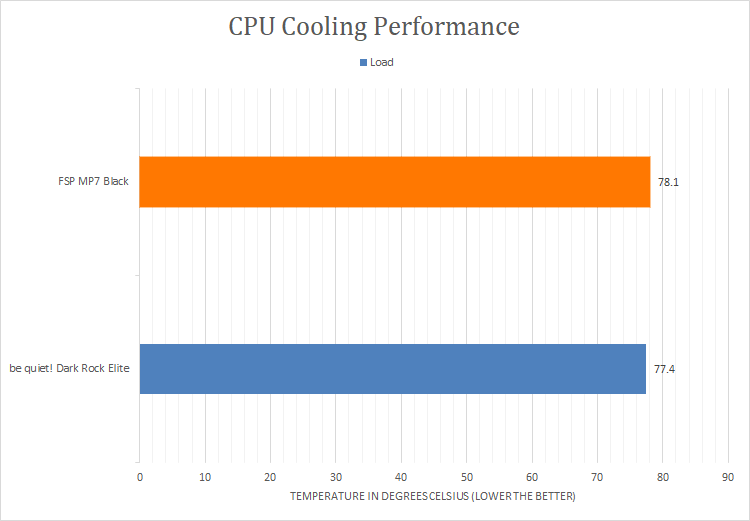
With more than enough time to load the processor, you can see how the two performed at their peak temperatures recorded. The FSP MP7 Black reached a peak temperature of 78.1c. This is slightly warmer than the be quiet! Dark Rock Elite at 77.4c, although both are perfectly acceptable given the larger heatsink and fans found on the Dark Rock Elite. There was no thermal throttling during our testing, and all cores were able to reach and sustain their boost frequencies.

In addition to the cooling performance tests, we also quantitatively measured the performance of the cooler by measuring the air speed at the outlet. The purpose of these tests is to see the airflow and static pressure of the complete cooling solution. Higher airflow is better, as it indicates the cooler's capability.
At the output of the FSP MP7 Black, it produced a maximum airflow of 11.8km/h or 7.3mph. Interestingly, this is actually higher than the Dark Rock Elite at 11.5km/h, although this measures more the ability for the fans to move air, and not necessarily the heatsink itself. Even so, it is impressive to see the capabilities of the MP7 Black fans.
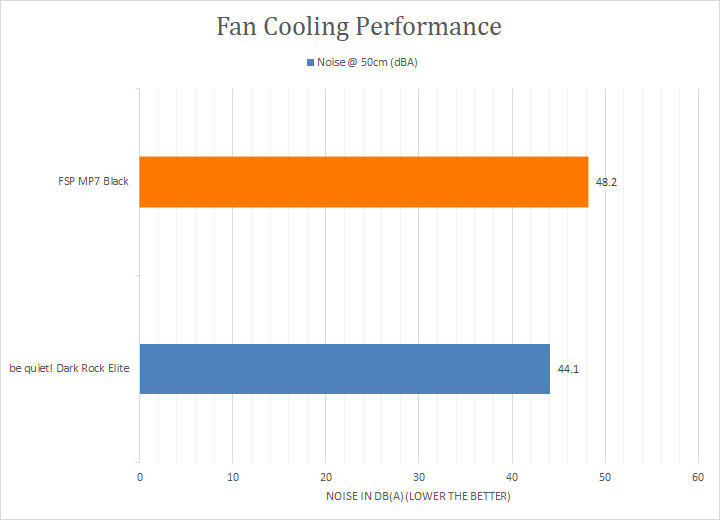
The noise produced by the FSP MP7 Black is a bit louder, especially at peak speeds. Measuring from 50cm away at maximum fan speed, the cooler produced 48.2dbA of noise. From a subjective standpoint, on a scale of 0 to 10, where 0 is silent and 10 is loud, I would rate the MP7 Black at 4.5/10 on full load. While the measured noise value may not jump off the page, I found the MP7 Black produced a higher-pitched sound that made it quite noticeable when it was under load. This reduces to a more reasonable output under lesser loads, but it is still notably louder than the be quiet! Dark Rock Elite. Overall, the FSP MP7 is performant and capable, but it can get louder at full blast.
Page Index
1. Introduction, Packaging, Specifications
2. Physical Look - Hardware
3. Installation and Test Results
4. Conclusion